Source: Microsoft
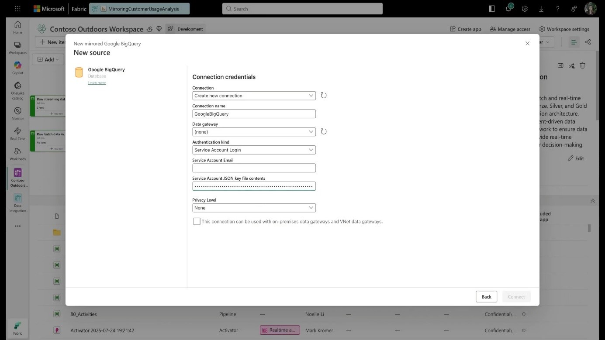
Microsoft Fabric has officially brought Mirroring for Google BigQuery to General Availability (GA), delivering zero-ETL replication for critical multi-cloud workloads. Enterprise data teams can now ingest BigQuery datasets directly into OneLake in open Delta format without building custom pipelines, managing sync schedules, or paying Fabric replication compute fees.
Seamless multi-cloud integration without pipeline friction
By moving from preview to production-ready GA status, BigQuery mirroring offers enterprise teams a fully managed, zero-ETL path into OneLake backed by official SLAs. Fabric handles snapshot creation, continuous change data capture (CDC), and schema evolution automatically.
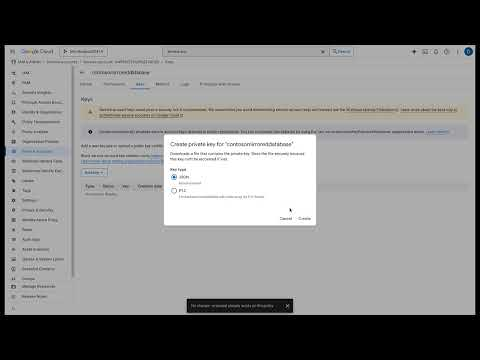
Whether adding columns or altering data types on the GCP side, schema changes flow downstream into OneLake without manual pipeline adjustments or maintenance overhead. Connectivity supports full enterprise network topologies, including Virtual Networks (VNET) and on-premises Data Gateways.
Unified analytics and Direct Lake speed across clouds
Mirrored BigQuery data lands directly as open Delta Lake tables, making it immediately accessible across the entire Fabric ecosystem-from Data Engineering notebooks to Copilot. For BI teams, the primary advantage is Direct Lake mode in Power BI.
Analytics teams can now run sub-second queries on large-scale BigQuery datasets with Import-like performance and DirectQuery freshness, completely bypassing traditional semantic model refresh windows. Because the underlying storage is open Delta, engines outside Fabric can also query the data without vendor lock-in.
Stronger architecture with material cost reduction
For enterprise architectures spanning both GCP and Microsoft environments, this update removes two historic pain points: pipeline maintenance and cross-cloud query friction. Organizations avoid complex ingestion jobs while cutting platform costs. Fabric charges zero compute fees for replication and incurs no network ingress charges.
Early adopters, such as Galeries Lafayette, report cutting background capacity consumption by up to 83% and lowering overall monthly compute bills by 75%. By turning cross-cloud data movement into a zero-overhead background service, data leaders can unify their analytics estate, improve query response times, and accelerate enterprise AI readiness.
Learn more on Fabric Updates Blog
Microsoft Fabric introduces soft delete to protect on-premises data gateways from accidental removal
Source: Microsoft
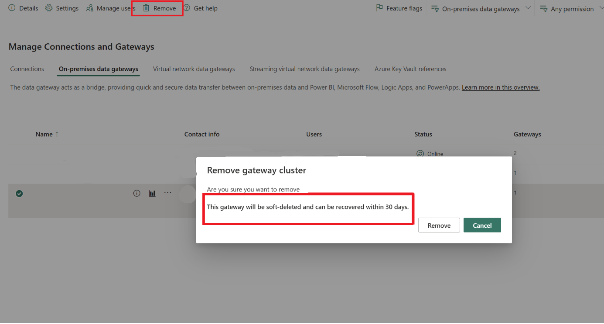
Enterprise data platforms rely on steady gateway connections to bridge cloud analytics with on-premises data source systems. Microsoft has introduced a soft delete lifecycle for standard mode on-premises data gateways in Microsoft Fabric (Preview). Instead of triggering immediate and permanent deletion, the new mechanism keeps removed clusters and nodes recoverable for 30 days. This update gives data platform teams a safety net against operational disruption, ensuring that human error does not turn into an outage that requires rebuilding gateways from scratch.
Safer gateway recovery and operational continuity
Deleting an on-premises data gateway used to mean an immediate, irreversible loss of configuration, metadata, and cluster permissions. Restoring connectivity meant recreating gateway instances manually, re-establishing security roles, and risking downtime for critical reporting and analytics pipelines.
With soft delete enabled, deleted gateway clusters and individual members enter a 30-day retention window accessible directly within the gateway management page in Microsoft Fabric. Authorized admins can recover a cluster along with its historical metadata with a single click, restoring connectivity without technical re-work.
Focused lifecycle controls for enterprise IT governance
The soft delete model acts as a dedicated resource recovery workflow rather than a granular backup system. It operates at the gateway cluster level rather than restoring individual nodes or isolated data sources independently. Access controls remain strictly permission-aware: only tenant and gateway admins can view, restore, or permanently purge retained entries before the 30-day window expires.
While automated API handling and audit logging are still planned for future releases, the current capability establishes a clear retention boundary that aligns Fabric resource management with enterprise IT governance standards.
Business value and impact on hybrid platform stability
For mid-market and enterprise organizations operating hybrid data architectures, gateway availability directly affects core business intelligence and downstream analytics. Unintentional deletion of a gateway node can halt automated data refresh cycles across multiple business units. Gateway soft delete eliminates this risk by converting a high-impact operational incident into a simple administrative routine. Platform leaders gain peace of mind, knowing that mission-critical hybrid data connections can be restored in seconds without wasting engineering resources on manual rebuilds.
Learn more on Fabric Updates Blog
Managing Power BI semantic models becomes faster with the new in-context settings pane
Source: Microsoft
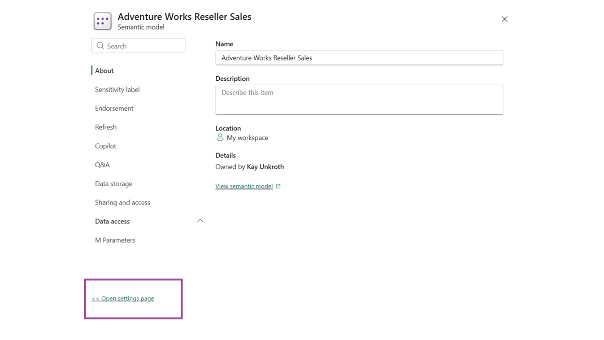
Managing semantic models in Microsoft Fabric and Power BI Service often meant leaving your workspace and disrupting your workflow just to tweak a refresh schedule or update data credentials. Microsoft is addressing this friction by making the side-panel settings pane the default experience, keeping workspace context fully visible while configuring settings.
Contextual editing reduces navigation friction in workspace management
The updated side-panel opens alongside your workspace on the right side of the screen, allowing data teams to review or modify settings without losing track of surrounding assets. Settings are organized into expandable sections and dedicated tabs covering refresh schedules, data access, performance, and storage connections like OneDrive and SharePoint.
A global search tool allows administrators to quickly jump directly to specific functions, such as typing "re" to access refresh history without drilling through nested menus manually.
Streamlining operational workflows for platform administrators
For enterprise BI managers and platform administrators overseeing extensive workspaces, this workflow change eliminates repetitive back-and-forth navigation between the classic settings page and workspace views.
While the classic full-page settings experience remains accessible via an "Open settings page" link at the bottom of the pane, Microsoft has signaled its eventual retirement. Upcoming enhancements will further consolidate related configurations, such as scheduled refreshes and data connections directly within the pane interface.
Driving administrative efficiency across large-scale Fabric deployments
While this update represents a user experience refinement rather than an architectural shift, it directly improves daily operational efficiency for central data teams managing hundreds of semantic models. By minimizing context-switching and streamlining routine administrative tasks, Microsoft Fabric lowers the management overhead required to maintain enterprise analytics at scale.
Learn more on Power BI Updates Blog
Microsoft Fabric unlocks programmatic lineage to power automated governance and lineage-aware AI

Source: Microsoft
Understanding data provenance and downstream dependencies has historically been a manual process locked inside portal visuals. Microsoft Fabric now provides direct programmatic access to its underlying dependency graph via the Fabric item relations API in Public Preview. By exposing upstream sources, downstream consumers, typed relations, and cross-workspace contexts through REST endpoints, organizations can embed lineage directly into CI/CD pipelines, automated impact analyses, and enterprise AI workflows.
Transforming manual dependency mapping into automated governance
Until now, tracing dependencies in Fabric required data engineers and architects to visually navigate the portal lineage view. While effective for localized troubleshooting, this visual-first approach creates operational bottlenecks at scale. The new relations API exposes two REST operations (/relations/downstream and /relations/upstream) that allow platform teams to programmatically interrogate the dependency graph.
By exposing granular edge types - including Shortcut, PushData, Orchestration, and Association - the API enables tools to distinguish between simple consumption and operational execution. Cross-workspace resolution ensures that dependencies spanning multiple environments are captured accurately, laying the groundwork for automated data cataloging and automated impact analysis before schema modifications or item deletions.
Grounding enterprise AI agents in operational reality
As organizations deploy AI agents to query data platforms, providing accurate contextual governance is critical. An LLM answering queries about financial metrics or pipeline status needs to understand data lineage to prevent hallucinating operational realities.
By exposing the dependency graph as an API surface, AI agents can dynamically query item relations to evaluate blast radius ("What breaks if this table changes?") or determine root cause ("Where did this metric originate?"). This extends Microsoft's strategy of sharing platform governance metadata - such as sensitivity labels - directly with AI reasoning engines, ensuring agents operate with complete dependency awareness across the enterprise estate.
Strategic value for enterprise platform teams
For mid-market and enterprise organizations running critical data workloads on Fabric, moving lineage from a visual UI feature to a programmable API represents a fundamental shift in platform management. DevSecOps teams can now insert automated lineage checks into deployment pipelines to block breaking changes before they reach production.
Enterprise architects and ISVs gain the ability to embed native dependency insights directly into custom developer portals and third-party tools. Ultimately, this API reduces operational risk, accelerates release cycles, and brings data governance directly into automated technical workflows.
Learn more on Fabric Updates Blog