
Welcome to the second article in a blog series on migrating SQL Server to Azure SQL.
In a previous article, we discussed the following:
- Why migrate SQL Server to Azure SQL?
- Migration strategy
- Azure SQL Family
- Migration pathways
In this article, we will focus on the overall step-by-step migration process, viz: Discovery, Evaluation, Migration, Switching, Optimization. Let's get started!
Migration process
The overall SQL Server migration process can be divided into several phases and steps. In our case, we divided it into five phases.
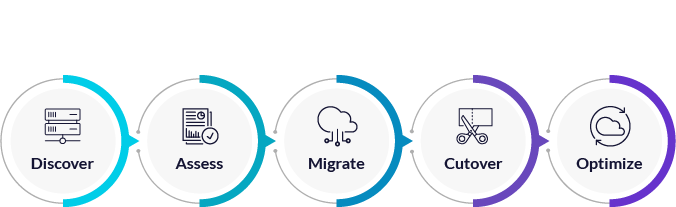
Discovery
The first step in migrating SQL Server to Azure SQL is to discover the existing database environment. This involves identifying the server and database instances to be migrated. This discovery is done using a dedicated Azure service, such as Azure Migrate, which can automate the process. If you have a large infrastructure hosted on VMware or Hyper-V, it is recommended that you install dedicated local infrastructure scanning software. The purpose of this step is to make sure that all key SQL Server instances and databases have been identified and included in the migration plan.
All the results of the discovery phase can be collected and presented in the Azure Migrate service. This service collects and consolidates all the required information about all SQL Server instances, the number of databases and their volumes, operating system and SQL Server versions, hardware specifications, but also about all machines and their dependencies (not only SQL Server) existing in the scanned infrastructure.
Azure Migrate is not just dedicated to SQL Server migration. It is a Microsoft tool that helps assess and migrate workloads from local servers to Azure. It provides a central hub for tracking migration progress and offers cost and size estimates to help organizations plan migrations.
Evaluation
In the second step, we assess which of our resources are ready for migration. Of course, we do not make this assessment "by eye," but use dedicated tools to help us do so. The assessment is done from both a hardware and an application perspective.
The assessment step involves analyzing the existing database environment to determine the best migration strategy. This includes assessing the complexity of the server and database environment, identifying potential challenges (e.g., lock-in and compatibility issues), and determining the best migration method. The results of the assessment include information on: - Azure SQL deployment model, i.e. Azure SQL VM, Azure SQL Managed Instance or Azure SQL Database - recommended configuration and sizing - cost estimates for the service
The following tools can be used to conduct the assessment:
- Azure Database Migration Service (ADMS)[https://learn.microsoft.com/en-us/azure/dms/].
- Azure SQL Migration extension for Azure Data Studio[https://learn.microsoft.com/en-us/sql/azure-data-studio/extensions/azure-sql-migration-extension?view=sql-server-ver16]
- PowerShell[https://learn.microsoft.com/en-us/powershell/module/az.migrate/?view=azps-9.4.0]
Migration
Once the evaluation stage is complete, the next step is migration. This is the actual process of moving data from the source SQL Server to Azure SQL. This stage can be done online or offline, depending on the needs of the organization.
Migration mode
Online migration involves creating a replica of the source database and then synchronizing it with the target Azure SQL database. This minimizes downtime during migration, but requires a stable network connection with sufficient bandwidth.
Offline migration involves backing up the source database and restoring it to the target Azure SQL database. This method requires more downtime, but is suitable for large volumes of data or when the source database is not available during the migration.
Supported migration scenarios from SQL Server to Azure SQL (valid as of 21.09.2023):
You can track the current status of the migration scenarios here:[https://learn.microsoft.com/en-us/azure/dms/resource-scenario-status]
Migration tools and services
To support the migration process, Microsoft provides several tools and services. Azure Database Migration Service (ADMS) is a fully managed service that simplifies the migration of databases from local servers to Azure SQL. It offers various migration methods, including online and offline migration, and supports a range of source databases, including SQL Server, MySQL and Oracle.
Azure SQL Migration extension for Azure Data Studio is a free extension that provides a graphical interface for migrating databases from SQL Server to Azure SQL. It enables online and offline migration, offering customization and optimization options. It also integrates with Azure Migrate and Azure Database Migration Service.
Database Migration Assistant (DMA) is another tool provided by Microsoft that helps assess the compatibility of local databases with Azure SQL. It also provides guidance on troubleshooting issues that may arise during the migration process.
Important factors
When migrating to Azure SQL, consider factors such as: - Volume of data to be migrated (number of servers, databases, etc.) - System availability during the migration process - Performance of both source and target databases - Network performance
All of these factors must be taken into account to ensure that the migration is completed in a reasonable amount of time and with minimal impact on the organization.
In addition, it is a good idea to plan the migration process in such a way as to minimize disruption to the organization. This may include conducting the migration during off-peak hours or using a phased migration approach to minimize downtime.
Summary
Overall, the "Migration" stage in the SQL Server to Azure SQL migration process is a crucial step that requires careful planning and consideration of important factors such as data volume and system performance. With the right tools and services, and by considering important issues such as data and network performance, organizations can successfully migrate their databases to Azure SQL, reaping the benefits of a modern, cloud-based database solution.
Switching
The switchover phase of SQL Server migration to Azure SQL is a crucial step to make sure all data has been moved and is available in the new environment. This requires careful planning and execution to minimize downtime and avoid data loss. For starters, make sure all data has been migrated and is in the new environment before proceeding with the switchover procedure.
Prior to switching to a new system, appropriate communication within the organization should be prepared. Stakeholders and end-users should be informed of the planned change, the migration time window should be defined, and consideration should be given to the possible unavailability of the system. In addition, it is useful to have a clear plan for the termination of the old system, including a decision as to whether the system should be kept for a certain period of time for archival purposes.
Optimization
Once the migration process is complete, it is important to focus on optimizing the new Azure SQL environment to ensure its efficient and effective operation. This can be done by monitoring and analyzing the database behavior and adjusting the hardware configuration to meet the database workload requirements.
The first step is to monitor the metrics of the new Azure SQL environment, such as CPU, memory and I/O. This will provide insight into the performance of the database and identify any bottlenecks.
Next, it's worth analyzing the database's behavior after the migration, reviewing indexes and statistics and performing a rebuild if necessary. This can improve query performance and overall database efficiency. You should also consider adjusting the hardware configuration, such as scaling up or down depending on the load requirements. This can be done manually or with auto-scaling, which will adjust the hardware for smaller workloads.
After a longer period of time, it is worth taking a look at the recommendations offered by the Azure Advisor service. This service can provide valuable tips for optimizing the cost of your Azure SQL environment.
Applications
The process of migrating from SQL Server to Azure SQL is a logical sequence of steps that includes the identification and assessment of the situation, i.e. the discovery of SQL Server instances and databases, and the potential target configuration. The results of the first two steps are at the same time inputs to the migration process, supported by available Azure services and tools. Migration doesn't end with the switch to Azure SQL, it is followed by optimization. By performing the migration according to a defined process, we maintain control over the migration, minimizing the risk of unforeseen situations.
The last article in the series will focus more on cost optimization, such as Azure Hybrid Benefit, Reserved Instance. It also includes a summary of tools and services to support the migration process.
Key takeaways from the article:
- Understand the migration process and steps,
- Discovering and assessing the current situation and planning the target state after migration,
- Prepare the switching procedure and communicate accordingly,
- Monitor the migrated solution and optimize.
Check out our first article in the series:
SQL Server migration to Azure SQL