

Microsoft Fabric streamlines compute cost troubleshooting with direct warehouse capacity metrics
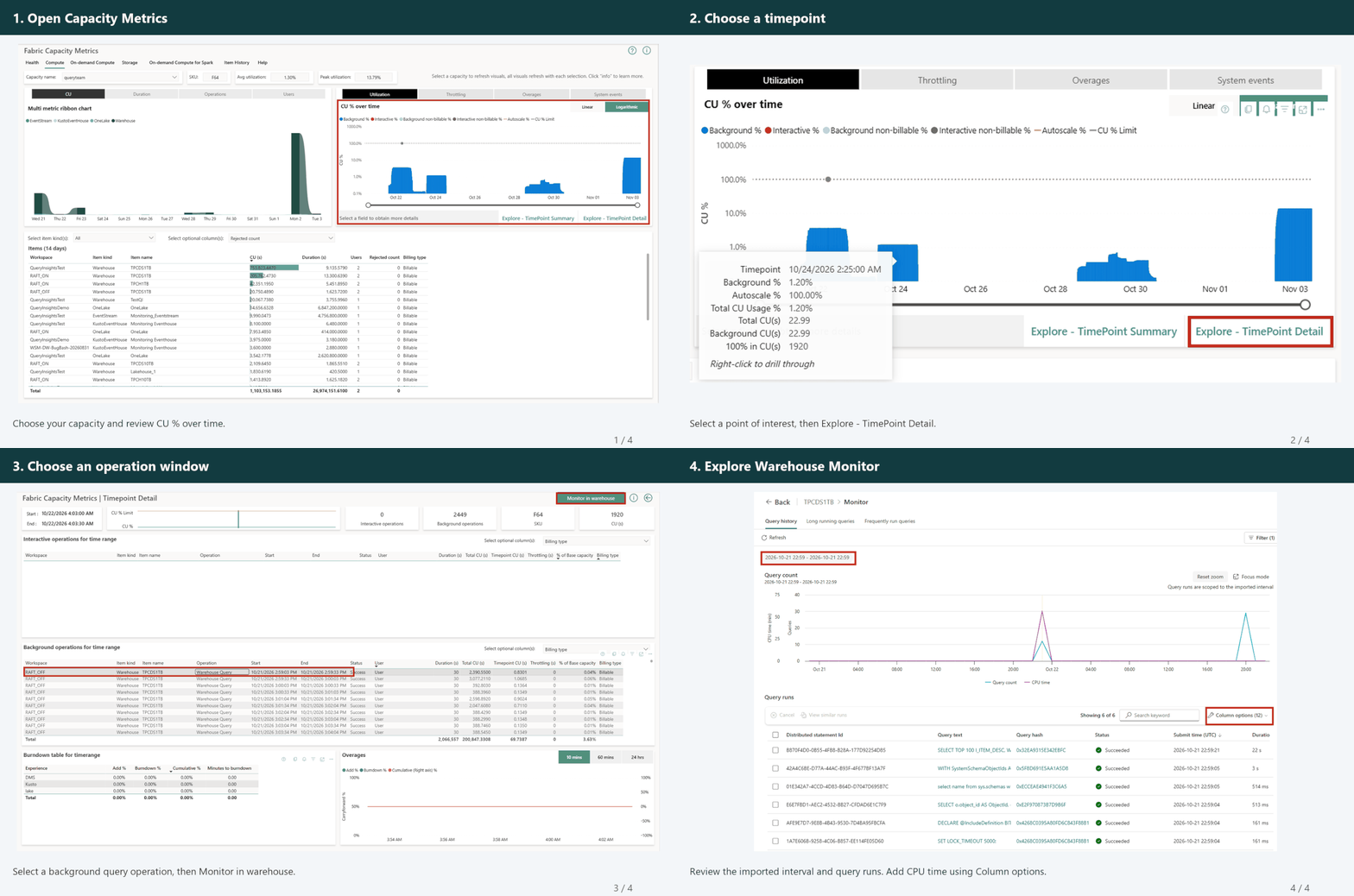
Tracking down the root cause of unexpected capacity consumption spikes in Microsoft Fabric historically meant jumping between disparate metrics dashboards and querying tools, piecing together timestamps to figure out which workload drained your compute allocation. Microsoft has simplified this governance headache by releasing the Monitor in Warehouse integration within the Fabric Capacity Metrics app to General Availability (GA). Enterprise teams can now drill straight from capacity-level consumption spikes into precise T-SQL execution logs within seconds.
Direct drill-down eliminates cross-dashboard friction
The updated Capacity Metrics workflow bridges the gap between high-level compute consumption and item-level query execution. When reviewing capacity unit (CU) utilization spikes on the Compute page, administrators can select a background operation window in the TimePoint Detail view and jump immediately to the corresponding time frame in Warehouse Monitor. This direct routing eliminates manual correlation errors, dramatically speeding up root-cause analysis for over-allocated capacity.
Target query performance to optimize capacity costs
Once inside Warehouse Monitor, data platform leads can isolate performance bottlenecks using concrete execution signals rather than elapsed duration alone. Sorting query history by CPU time surfaces heavy processor usage, while comparing OneLake reads, local disk hits, and memory utilization reveals caching behavior. Integrated attributes like result cache hits, distributed execution flags, and workload labels help data engineers distinguish between poorly optimized join patterns, failed scripts, and legitimate business processing.
For enterprise data leaders managing shared Fabric capacities, this integration transforms capacity governance from a reactive guessing game into a streamlined auditing process. Platform managers can rapidly identify runaway queries, enforce optimal caching practices, and guide developers toward better query design before compute overload impacts parallel business operations.
Learn more on Fabric Updates Blog
Data Days 2026 brings hands-on AI execution to enterprise data teams
Microsoft has launched Data Days, a structured learning and building initiative running from November 2 through December 15 designed to accelerate real-world AI adoption across Microsoft Fabric, SQL, and Power BI. Unlike standard promotional keynotes, this event focuses on practical execution, offering hands-on technical tracks, community study groups, and direct pathways to Microsoft certifications. For enterprise data leaders, it provides a timely framework to upskill teams, validate Fabric architectures, and leverage exam discount vouchers for core data platform certifications.
Accelerating Fabric IQ and Fabric Apps adoption across three practical stages
At the core of Data Days is the "AI Work" track, structured into three distinct stages to guide teams from foundational architecture to active deployment. The initial stage, "Let's Make Sense of It," clarifies how Copilot, Fabric IQ, Fabric Apps, and enterprise datasets integrate within a unified data estate. This helps data architects and platform managers evaluate where AI capabilities add genuine operational value versus unnecessary overhead.
The second and third stages transition directly into technical execution and real-world reference architectures. "Let's Build Something" offers interactive sessions where data engineers use Spark to transform raw corporate data into AI-ready assets while assembling practical Fabric Apps. Simultaneously, the "See It in Action" track showcases live implementations created by community builders, detailing key architectural choices, governance considerations, and operational lessons learned during deployment.
Upskilling engineering teams with certification support and technical recaps
Beyond live technical demonstrations, Data Days addresses the persistent skills gap in modern data engineering through structured certification preparation. Eligible enterprise participants can access 100% discount vouchers for key credential exams, including DP-600 (Fabric Analytics Engineer), DP-700, and DP-800, alongside 50% discounts on select supplementary exams.
The initiative also incorporates recap sessions covering recent announcements from FabCon and SQLCon, alongside specialized Power BI data visualization workshops and the Power BI Dataviz World Championships. Organizations can participate through internal community study groups or by hosting dedicated sessions, allowing IT leaders to align team training directly with upcoming data platform migrations.
Strategic value for enterprise data leadership
For Chief Data Officers and IT directors operating in mid-market and enterprise environments, Data Days represents more than a series of webcasts. As organizations evaluate or scale their Fabric footprint, the primary bottleneck is rarely feature availability, but rather team readiness and effective architectural design.
By utilizing these hands-on tracks and subsidized certification pathways, platform leaders can structuredly upskill data engineering teams on Fabric IQ and Spark pipelines without incurring substantial training overhead. The focus on peer-tested implementations provides data architects with concrete blueprints to lower deployment risks, optimize compute usage, and bridge the gap between transactional data stores and enterprise AI readiness.
Learn more on Fabric Updates Blog
Lock in early rates for FABCON + SQLCON 2027 in Atlanta
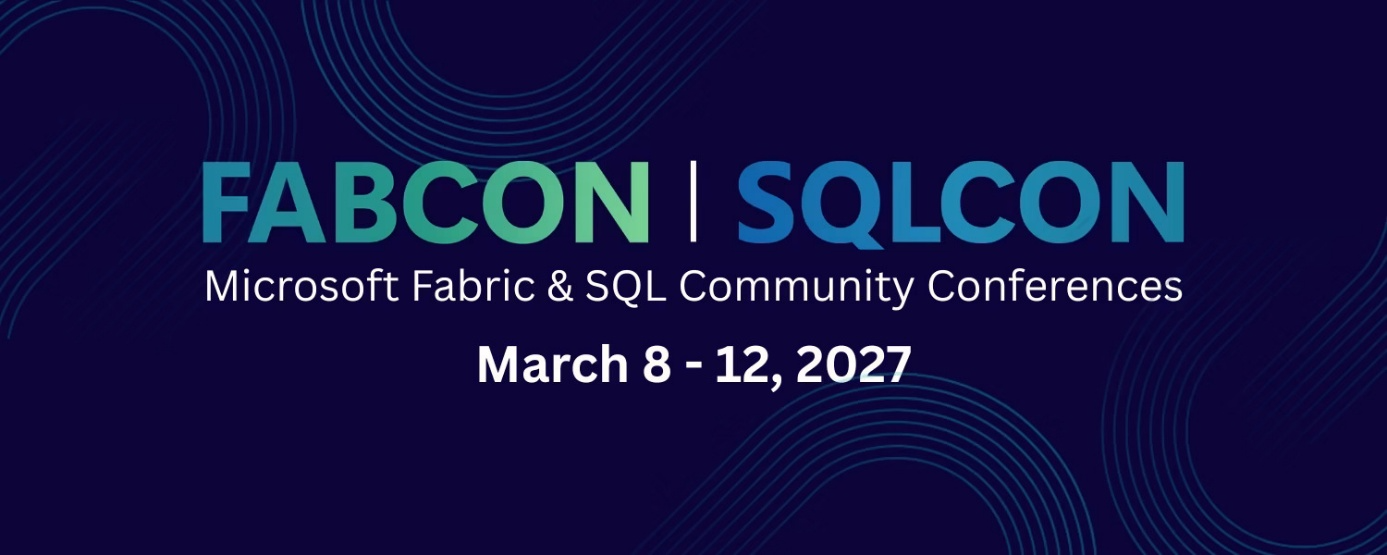
Early registration is now open for FABCON + SQLCON 2027, bringing the Microsoft data community together in Atlanta from March 8-12, 2027. Enterprise data teams can combine early-access pricing with community discounts to save up to $500 per attendee before November 13, alongside exclusive BOGO options for strategic partners.
Unified learning across Microsoft Fabric, SQL, and Azure AI
FABCON + SQLCON 2027 merges two major technical conferences into a single registration, allowing attendees to cross-attend sessions across Microsoft Fabric, SQL Server, and Azure AI. The five-day event covers critical enterprise domains including platform governance, data engineering, advanced analytics, and scalable architecture. Technical leads can build practical capabilities through expert-led workshops, direct interaction with Microsoft product teams, and real-world implementation case studies.
Maximizing budget efficiency for data team attendance
Organizations planning their 2027 training and event budgets can leverage multiple stackable savings mechanisms prior to the November 13 cutoff:
- Early-access discount: Save $300 automatically by completing registration before November 13.
- Community savings: Save an extra $200 by applying discount code MSCMTY during checkout.
- Enterprise licensing perks: Secure limited buy one, get one (BOGO) passes by coordinating directly with your Microsoft account team or Fabric partner.
Strategic value for enterprise data leadership
For CDOs, Heads of Data, and Enterprise Architects, sending key staff to FABCON + SQLCON 2027 provides direct access to upcoming platform roadmaps and battle-tested deployment patterns.
As organizations scale Microsoft Fabric alongside legacy SQL investments and emerging Azure AI workloads, cross-disciplinary exposure ensures architectural alignment, tighter governance practices, and faster implementation of enterprise capabilities.
Learn more on Fabric Updates Blog
Microsoft Fabric relaxes Outbound Access Protection rules for cross-workspace Power BI reports
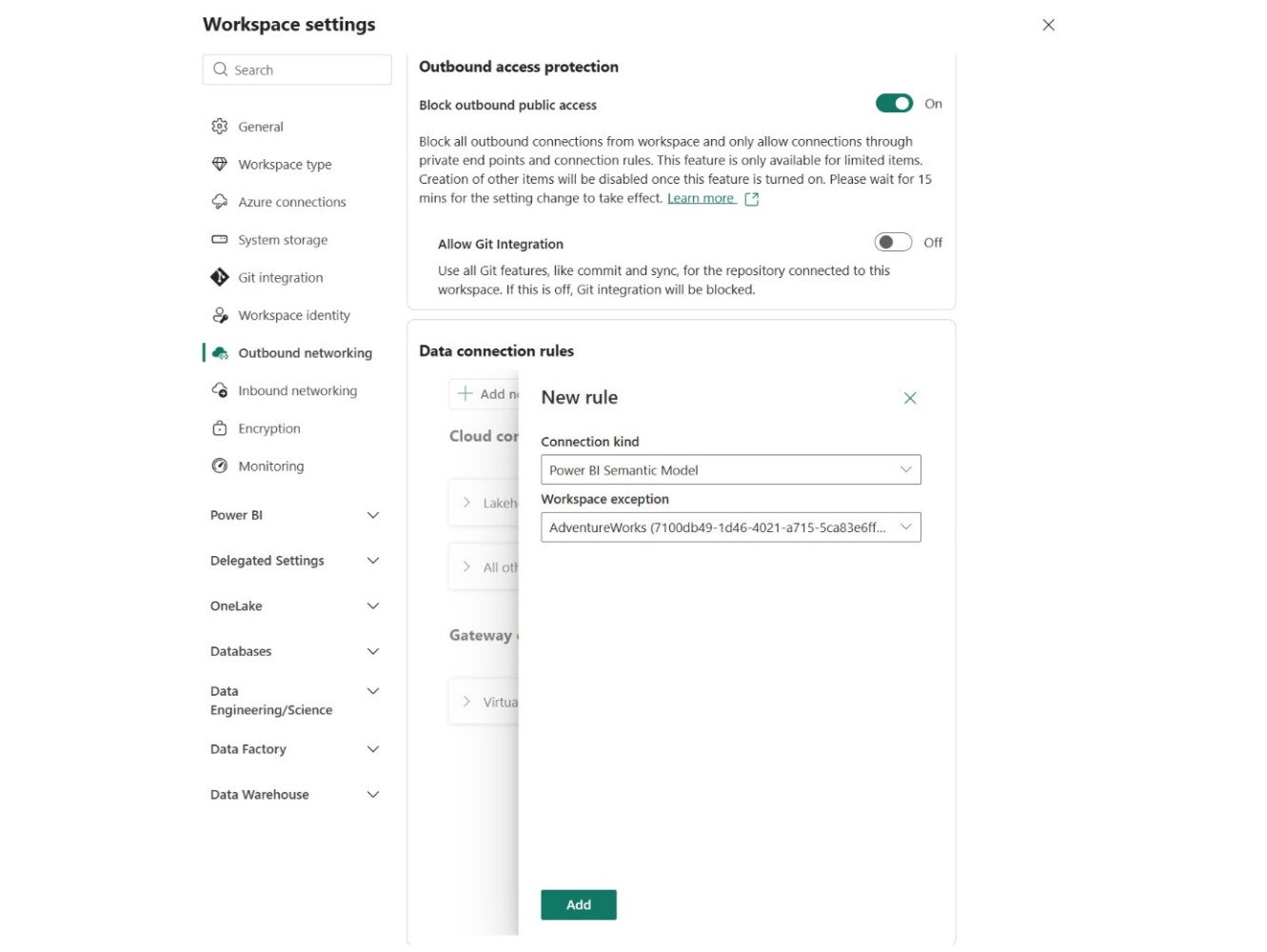
Microsoft Fabric has updated Outbound Access Protection (OAP) for Power BI reports, enabling cross-workspace connections to semantic models via configurable exception policies. Previously, OAP forced organizations to store reports and their underlying semantic models in the exact same workspace to maintain network boundaries. This limitation broke common enterprise architectures that rely on centralized, governance-controlled semantic models serving distributed business reporting teams. With this update, enterprise data teams can maintain strict data exfiltration controls while restoring the clean separation of data ownership across workspace boundaries.
Restoring enterprise architecture patterns in OAP-protected environments
The initial June preview of workspace Outbound Access Protection enforced an all-or-nothing boundary: a report in an OAP-protected workspace could only connect to a semantic model residing within that same workspace. While effective for strict data isolation, this design created significant friction for enterprise hub-and-spoke models. Centralized data platform teams typically host curated, single-source-of-truth semantic models in dedicated workspaces, while business units build tailored reports in separate workspaces.
The update resolves this friction by allowing workspace administrators to configure explicit destination rules under Outbound networking settings. By defining "Power BI Semantic Model" connection rules, admins can whitelist specific target workspaces without removing the workspace outbound boundary entirely.
Enforcing two-tier security controls without breaking report bindings
Cross-workspace connections remain blocked by default until an explicit exception rule is saved. When a report opens, Power BI evaluates the report workspace's OAP policy before rendering visuals in the browser. If no valid exception rule exists, the connection is blocked immediately.
Crucially, this policy update does not bypass data-level governance. The downstream semantic model remains fully protected by its own OAP configuration. Any outbound queries from the semantic model to underlying cloud databases, lakehouses, or on-premises gateways continue to be evaluated against the semantic model workspace's own data connection rules. Both the report workspace and semantic model workspace must have OAP active to ensure end-to-end security enforcement.
Balancing enterprise data exfiltration prevention with domain ownership
For enterprise data leaders and platform architects, this improvement eliminates a major tradeoff between network security and scalable governance. Organizations no longer have to choose between collapsing their domain boundaries or turning off OAP entirely for reporting environments. Central data teams can continue enforcing strict data egress policies while empowering business units to build reports independently.
To roll out this feature, workspace administrators should verify OAP prerequisites across all affected environments, establish target connection rules for approved semantic model workspaces, and allow approximately 15 minutes for policy changes to propagate across the tenant.
Learn more on Power BI Updates Blog
Navigating the New Power Query Experience in Power BI Desktop
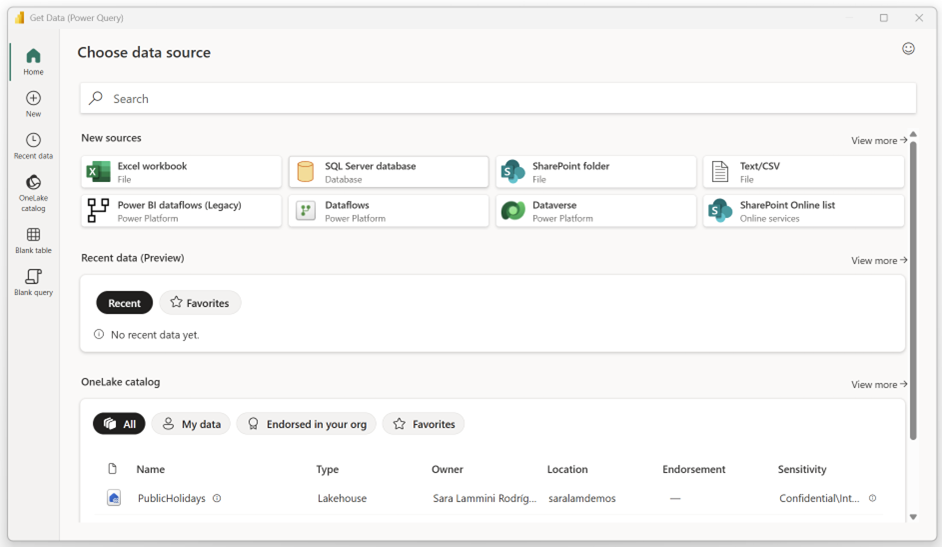
Getting data shouldn't always begin with a connector name. When preparing enterprise reports, your team might already maintain certified assets in OneLake, want to reuse established query logic, or need to return to a known source from yesterday. The new Power Query preview in Power BI Desktop introduces a module-based approach designed to support these different starting points instead of forcing every workflow through a standard connector picker.
Modular Data Discovery for Enterprise Teams
The traditional Get Data experience assumes you already know the exact connector you need. The new preview changes this by organizing discovery around how data professionals actually work. Home brings available routes together, while dedicated modules like New, Recent data, and the OneLake catalog give specific tasks room for their own search and context.
For enterprise architects and data platform managers, the OneLake catalog is the most significant addition. When multiple datasets share similar names, catalog context helps teams verify an item's business type, owner, sensitivity, and endorsement before committing a report to production. This reduces duplicate data ingestion and ensures reports are built on governed assets rather than local exports. Meanwhile, direct paths remain intact for familiar sources like CSV files, ensuring developer productivity doesn't slow down for routine tasks.
Addressing Early Feedback and Workflow Blockers
While modular discovery improves navigation, early user feedback highlights critical gaps that enterprise teams must consider before enabling the preview. Initial iterations removed the native-SQL input for supported database connectors, halting workflows where teams rely on custom queries to shape data at the source. Microsoft has since restored native-SQL entry for initial connections, but reopening and editing those settings through the step gear icon remains partially limited.
Other frequently reported friction points include loading performance for familiar connectors, missing advanced Web settings like custom request headers (such as X-API-Key configurations), and Combine Files issues in folder and SharePoint workflows. If your analytics engineers rely heavily on advanced web parameters or rapid iterative development, testing these scenarios in a nonproduction environment is essential before rolling out the preview broadly.
Balancing Productivity and Governance
The new Power Query experience bridges the gap between ad-hoc exploration and enterprise governance. By separating data item discovery in the OneLake catalog from personal query logic in My Queries, it gives developers cleaner tools to reuse transformations without risking data integrity.
However, because the experience is still in preview, organizations must weigh these usability gains against current limitations in connection editing and advanced settings. You can evaluate the update in the October 2026 release of Power BI Desktop by enabling the preview feature in options, with performance improvements expected soon.
Learn more on Power BI Updates Blog