
Welcome to the last article in a series on migrating SQL Server to Azure SQL.
Previous articles have discussed the following issues:
Article 1:
- Why migrate SQL Server to Azure SQL?
- Migration strategy
- Azure SQL Family
- Migration pathways
Article 2:
- Migration process and steps (Discovery, Assessment, Migration, Switching, Optimization)
The last part focuses on cost optimization, i.e. Azure Hybrid Benefit, Reserved Instance, and briefly describes tools and services to support the migration process.
Cost optimization
When you migrate SQL Server to Azure SQL, you should consider two additional cost optimization options: Azure Hybrid Benefit and Reserved Instances.
Azure Hybrid Benefit
Existing SQL Server licenses should not be an obstacle to migration. Microsoft offers an Azure Hybrid Benefit program that allows you to use your existing SQL Server licenses and Software Assurance benefits to move workloads to Azure SQL and reduce costs.
Key features of Azure Hybrid Benefit include:
- Cost savings, simplified licensing, flexibility, compatibility
- Up to 180 days of dual-use rights between local and Azure environments
- Moving licenses to IAAS (Azure SQL VM) or PAAS (Azure SQL Managed Instance or Azure SQL Database)
- License conversion ratio up to 1:4
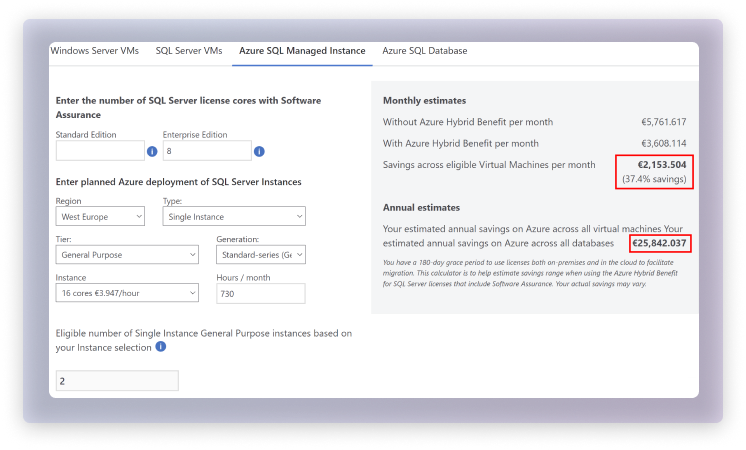
The exact number of qualifying Azure SQL VM or Azure SQL Managed Instances can be estimated using a dedicated calculator. Additional information on the potential monthly and annual savings that can be achieved with Azure Hybrid Benefit is also available.
Reserved Instance
Azure Reserved Instances (RI) allows you to reserve Azure SQL VM, Azure SQL Managed Instance*, Azure SQL Database* instances for one to three years in advance, providing significant savings compared to the prices you pay for usage. Key benefits of Reserved Instances include price predictability, flexibility in usage, and guaranteed resource availability.
Important: The RI option is only available for the vCore purchase model.
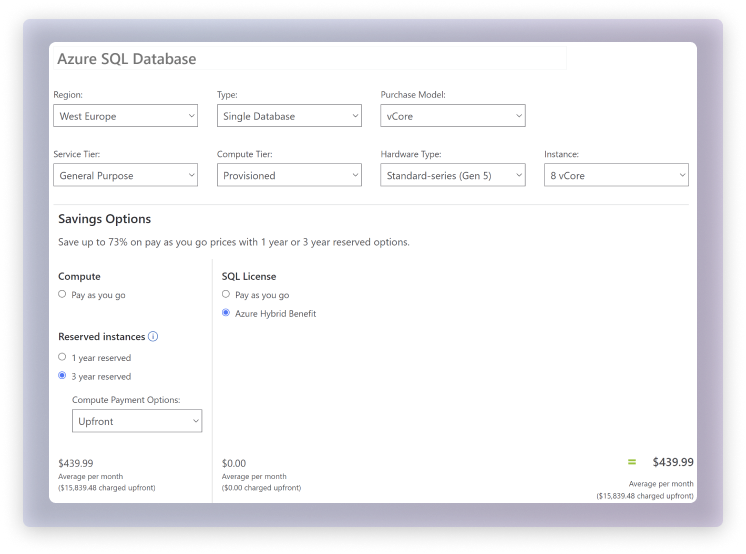
For Azure SQL, Reserved Instances can optimize costs by offering discounted pricing on reserved capacity. With the help of Reserved Instances, you can reserve a certain amount of vCore for your SQL database, saving up to 33% compared to pay-per-use prices. This helps you manage costs and forecast expenses more effectively, while retaining the flexibility to adjust usage as needed. Overall, Reserved Instances in Azure can help you achieve significant savings and better control over resources in Azure.
You can calculate potential savings using Azure's pricing calculator.
Tools
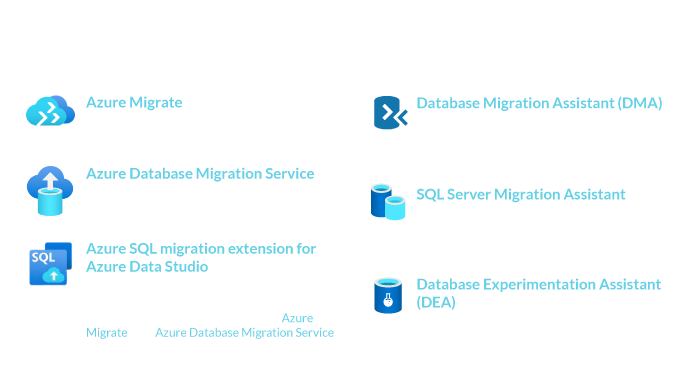
There are many tools and services available to support the migration process, and their various functions can be difficult to understand. Here is a brief overview of each of the tools and services:
- Azure Migrate - a central service (hub) that coordinates and tracks migrations to Azure. It supports not only SQL Server migrations, but also the migration of VMware virtual machines, physical servers to Azure and the migration of web applications to Azure App Service, etc.
- Azure Database Migration Service (ADMS) - a fully managed service designed to help migrate local databases to Azure data platforms with minimal downtime. It provides a guide to facilitate the migration process and supports a wide range of source databases, including SQL Server, Oracle, MySQL, etc.
- Azure SQL migration extension for Azure Data Studio - extension for assessing readiness and performing migrations to Azure SQL. Integrates with Azure Migrate and Azure Database Migration Service.
- Database Migration Assistant (DMA) - SQL Server tool for assessing readiness and migration to Azure SQL.
- SQL Server Migration Assistant - a tool for automating the migration of databases from Access, DB2, MySQL, Oracle, SAP ASE to SQL Server (local version).
- Database Experimentation Assistant (DEA) - a tool for evaluating database load/behavior before upgrading to a higher version of SQL Server.
In the context of migrating to Azure SQL, the most common uses will be: Azure Migrate, Azure Database Migration Service (ADMS) and the Azure SQL migration extension for Azure Data Studio.
Links to tools:
- Azure Migrate: https://learn.microsoft.com/en-us/azure/migrate/
- Azure Database Migration Service (ADMS): https://learn.microsoft.com/en-us/azure/dms/dms-overview
- Azure SQL migration extension for Azure Data Studio: https://learn.microsoft.com/en-us/sql/azure-data-studio/extensions/azure-sql-migration-extension?view=sql-server-ver16
- Database Migration Assistant (DMA): https://learn.microsoft.com/en-us/sql/dma/dma-overview?view=sql-server-ver16
- SQL Server Migration Assistant: https://learn.microsoft.com/en-us/sql/ssma/sql-server-migration-assistant?view=sql-server-ver16
- Database Experimentation Assistant (DEA): https://learn.microsoft.com/en-us/sql/dea/database-experimentation-assistant-overview?view=sql-server-ver16
Summary
The migration process does not end with the switch to Azure SQL. The "Optimization" step is an ongoing process that is part of daily tasks. It is worth considering and taking advantage of available cost optimization options such as Azure Hybrid Benefit and Reserved Instances when planning a migration. Existing licenses are not an obstacle to migration and can be used effectively when migrating or upgrading applications. In the medium to long term, it is worth monitoring and reviewing the suggestions generated by the Azure Advisor service.
The migration process is supported by many services and tools, which can lead to some confusion. Be sure to read the documentation carefully and use the appropriate tools during the migration. When migrating to Azure SQL, three of these tools will be used most often: Azure Migrate, Azure Database Migration Service and the extension for Azure Data Studio.
Key findings
- Existing licenses can be transferred to Azure
- Take advantage of the transition period to run SQL Server and Azure SQL simultaneously, minimizing costs
- Consider Reserved Instance (IAAS and PAAS).
- Understand and choose the right tools when migrating
Read the previous articles in this series:
Part 1: SQL Server migration to Azure SQL
Part 2: Migrating SQL Server to Azure SQL, Part 2